Social Media Marketing

Twitter Image Galleries

Written by , September 28th, 2011

You’ve probably noticed Twitter’s new image galleries popping up on people’s profiles. This feature, which made its debut in June, shows the 100 most recent images you’ve tweeted – back dated until January 1, 2010. It archives all images you’ve uploaded either directly to Twitter or through a 3rd party application such as yFrog, TwitPic or Instagram.

On your profile, you will see a few highlighted recent images and if you click the ‘view all’ button you will see the 100 most recent pictures you have uploaded to Twitter, along with the corresponding text you originally tweeted.

To upload an image direct to Twitter use the following steps:

Step 1:

Login to Twitter and click the ‘new tweet’ button, in the ‘what’s happening’ box, click on the camera button to add an image from your saved files.

tweet now Twitter Image Galleries

Step 2:

Add a tweet to your image after you’ve uploaded it and click ‘Tweet’ to both send it to your Twitter stream and to your gallery.

twitter image1 Twitter Image Galleries

Your image will be archived in your Twitter gallery as long as it’s one of your 100 most recent tweets. After that, it will be replaced by your most recent image uploads.

Want to know more? Here’s Twitter’s official introduction to their new image galleries:


Biggest Mistakes You Can Make with Your Facebook Page

Written by , September 21st, 2011

Time and again, when discussing Facebook pages with people, we realize that there are many misconceptions about how these pages work. Below, we discuss a few common mistakes so that you don’t repeat them with your business page.

Mistake #1: Thinking fans frequently visit your business page

Most people only ever visit your fan page once, and after that they interact with your page via their newsfeed. Some highly interactive and engaging business pages see frequent repeat visitors, but the majority of fans interact with your page by liking and commenting on postings that appear in their newsfeeds. In order to drive more traffic to your fan page it is important to recognize this fact and post in such a way that entices fans to return to your page. For example, “we’ve posted new photos albums to our page”, or “we post daily tips every weekday, scroll down our page for lots of great advice”.

Mistake #2: Believing fans see every post published to your business page’s wall

Many pages owners think that every fan of their page is seeing everything they post. This is far from true. The easiest way to think about how fans see your postings is to think about how you see content on your personal Facebook profile. What appears in your newsfeed is only a fraction of your friend’s activity, it is the information that Facebook has deemed important enough for you to see based, in part, on who you interact with most on Facebook. It is possible to change your newsfeed settings so that you see everything that has recently been posted, but fewer than 10-20% of Facebook users modify these settings.

FB page postings Biggest Mistakes You Can Make with Your Facebook Page

How can you change how many fans see your postings? Engage your audience! Each time a fan comments on one of your postings it shows up on their Facebook page and in their friend’s newsfeeds. Also, the more a fan likes, comments and interacts with your page, the more often your postings show up in their newsfeed.

Mistake #3: Ignoring fan comments

A successful business page involves conversations between you and your fans. If you never respond to fan comments, they won’t continue commenting for long. No one wants to talk to a brick wall (pun intended!). The more you respond to fans, the more they will comment and interact with your page. On a similar note, respond to negative comments instead of deleting them from your wall. Social media is about being transparent, and deleting negative comments is the opposite of the image you want to portray. Instead, respond promptly to negative comments and address the person’s concerns in a timely, friendly manner. Often times, even negative comments can be an opportunity for you to shine by showing you care about your customers and their opinions, and that you respond to comments and concerns quickly.

Mistake #4: Posting content all about you, and way too often

You don’t want to hog your fan’s newsfeeds with 4 or 5 posts all in row, this is a surefire way to get them to unlike your page. Instead, aim to post content 1-2 times a day, and spread your posts out a bit throughout the day. We highly recommend the 80/20 rule – 80% of the time, post interesting content from your industry and 20% of the time, post promotional content about your brand or company. The goal is to draw fans to your page and position yourself as the go-to-resource for the newest and greatest information in your industry. If you do this correctly, fans will naturally be interested in finding out more about your company – without your having to be overly promotional or salesy.

Mistake #5: Not taking advantage of the many features available to business pages

There are many customization features available to Facebook pages, why wouldn’t you take advantage of them? Start by claiming your vanity url if you have over 25 fans. This will make it easier for fans to find your page, and increase your visibility in search results. Next, create custom tabs on your Facebook page, including a custom welcome page, and set your welcome tab as the default landing tab for non-fans. Finally, link your various social media accounts to your Facebook page, including your blog, YouTube, and autoposting your Facebook updates to your Twitter account.

Mistake #6: Not budgeting for Facebook Ads

Facebook Ads are a great way to gain fans and awareness of your page – these ads are highly targeted and their precision is virtually unrivaled. Best of all, you set the budget! Spend as little as $1 a day or as much as you’re comfortable with, and you only pay when people click on your ad. Facebook Ads can send people either to your Facebook page or to your external website and are an integral part of building awareness of your business.

facebook ads Biggest Mistakes You Can Make with Your Facebook Page

Mistake #7: Running illegal Facebook competitions and contests

Most Facebook page admins are unaware of Facebook’s rules and regulations surrounding contests and promotions, but it’s important to know the details before you inadvertently get your Facebook page deleted for running an illegal contest. In our blog post on Facebook contests, we cut through the legalese and explain the rules and regulations in a straightforward way so you know exactly how to run a contest that follows Facebook’s guidelines.

facebook contest Biggest Mistakes You Can Make with Your Facebook Page

If you avoid making these 7 mistakes with your Facebook page you will be well on your way to creating an engaging and popular business page. If you need assistance with your business page, contact us and we’d be happy to help.

Social Media Works if You Make it Work for You

Written by , September 02nd, 2011

The following is a blog post written by Christine Rondeau of Bluelime Media. With her permission, we’ve reprinted it on our blog. If you’d like to see the original, click here.


Almost every week, I’m asked questions on the merit of social media. People are curious about why one would need to use facebook or twitter. My usual response is that social media works, but it only works if you make it work for you.

Of course it takes time and effort and you will need to moderate your social media accounts. Could you hire someone to do that for you? Sure, but you could also hire someone to look after your kids and raise them. Is that what you want?

In order to clearly explain what I mean by “making it work for you” I thought I would share what my process is and how I make it work for me.

Fortunately, I started early. I’ve been blogging since 2004, so blogging is part of my social media strategy. This strategy is no more than a word though. I don’t have a blogging schedule and I’m not very discipline. I write blog posts when I have something to say but I always write on topic.

If you choose to start a blog, think about what you want to blog about. Check out other blogs and see what they are doing. Would you be simply repeating what others are already saying? Do you feel like you have something important to add? Will you be gaining clients or positioning yourself as a market leader if you do?

More importantly think about your love or writing. If you dislike writing, blogging may not be for you.

I think I joined LinkedIn as early as 2002. LinkedIn was quiet for a long time but recently gained a lot of traction and criticism. I was happy enough with LinkedIn, I never paid attention to it and connected with people I knew when requested, but about 8 months ago, I started receiving many more requests from total strangers. For some reason LinkedIn became more about how many connections one has than who your connections are. I examined my LinkedIn profile and decided that it really wasn’t serving, so simply killed it. Since then, no more requests to connect with strangers.

Since then created I’ve created an about.me profile and posted my resume on Zerply. Why? They were both free and fun to put together. If either one of them follows in LinkedIn’s footsteps and becomes a nuisance, I’ll just delete them.

I joined Facebook 3 years ago (I think). You can look for me if you want but I won’t friend you, sorry. I only use facebook for family and yoga. I use it as a tool to keep informed of upcoming yoga events and look at my sister’s picture. That’s it. I don’t have a fan page and I’ve never ‘Liked’ a page. I personally am not a fan of facebook, because I find it too cluttered and messy. Some folks love it and it works for them, great, but it’s just not for me.

I was a bit late to join twitter and took a while to get it, but twitter is by far my favourite social media tool. I like it because it works for me.

Again, like facebook, I’m very particular about who I follow. 99% of the people I follow are either WordPress developers or work in the web industry. I keep the number of people I follow to about 200 and unfollow anyone who posts too many drunken tweets, sexist ones or only talks about hockey.

Because most of the people I follow are WordPress devs, I tweet a lot about WordPress and use it when I have questions. Just yesterday, I had issues with github. I tweeted my dismay and sure enough, a few minutes later, I had answers to my problem. How brilliant is that?

Sure I could have done the same on facebook, Google + or LinkedIn, but twitter is the medium I prefer.

I don’t think that there’s a definite guide on how to use social media. We all have different needs, different likes and dislikes. If you are curious about social media, I would encourage you to just sign up and open account. Any of them will do. Just try it out. Accounts can always be closed if they are not for you.

There are many dos and don’t when it comes to social media. I won’t go into all of the details here as I am no social media expert. If you’re interested in reading more about Social Media and learning a few tips and tricks, I would recommend that you subscribe to Boxcar Marketing’s Newsletter: Underwire. It’s very well written always packed full of interesting tidbits.

StumbleUpon Brilliance

Written by , August 19th, 2011

Ever stumbled upon brilliance? It comes when you least expect it, in the most surprising of ways, and at the most useful of times.stumbleupon StumbleUpon Brilliance Such is the brilliance of StumbleUpon. Social media discovery tool StumbleUpon has developed into the internet’s version of PVR, essentially selecting sites and references most applicable to the viewer and recording them in one strongly organized and easy to use location.  Recently reaching the 25 billion click mark, StumbleUpon users have grown to appreciate the site’s keen sense of finding what is new, what is interesting, and what is most relevant to them.

Why bother stumbling?

With the amount of material available on the internet, getting access to information that has already been pre-scanned by people of similar interests greatly reduces time wasted on websites of little to no relevance on topics of interest. After all, who can complain when a free internet service is similar to having 20 million personal secretaries pre-select articles based upon your profile?

By employing essentially an open call, or crowdsourcing strategy, in which an undefined set of people are able to contribute information and opinions regarding web searches allows the compilation of more valuable and fresh concepts, ideas, and links. To illustrate, stumblers help one another find hidden gems, pieces of information not easily found using any average search engine. As well, collaborative ratings from fellow stumblers and stumbler friends establish the worth and value of the website in reference to its content, clarity, and helpfulness. When one voice makes a comment, it can only be heard so far, and only be taken so far into consideration. However, when millions of voices combine together, they can be heard around the world, and their collective perspective is then able to demand greater respect and attention. After all, one may not hear an individual’s footsteps, but it is hard to not acknowledge the presence of a stampede. Finally, both new and old companies alike can benefit using StumbleUpon’s services as new traffic can be generated and directed towards their websites, the only downfall being a higher bounce rate. Yet, all traffic can be seen as good traffic as exposure for a website is key to gaining attention and broadening an audience.

In today’s people-driven world, the ability of a website to combine in perfect harmony social behaviour and interaction as well as time effectiveness is a formula which ultimately sets it apart as a website catering to the real needs of the user. Next time you are looking for a little inspiration, don’t be afraid to explore what you just may have stumbled upon.

Search. Stumble. Share!


Advertising on Popular Social Networks

Written by , August 17th, 2011

out smarts ad Advertising on Popular Social NetworksAdvertising on social networks like Facebook, Twitter and LinkedIn is becoming more and more popular. A recent Pivot Survey showed that two thirds of marketers surveyed are using social media advertising. This will only continue to grow as more and more people join the ranks of social media users, and companies catch on to the highly targeted and effective nature of this medium.

Often called social advertising, this method (based on a very old approach) takes advantage of the growing number of people using social networks (700m on Facebook, 100m+ on LinkedIn, etc) to advertise to people in a highly targeted way – usually according to their likes, geographic demographics and other defining characteristics. It can be a really useful tool to drive traffic to your website, and especially to build your connections because each follower or connection has given you their implied permission to keep in touch, and are genuinely interested in what you have to offer.

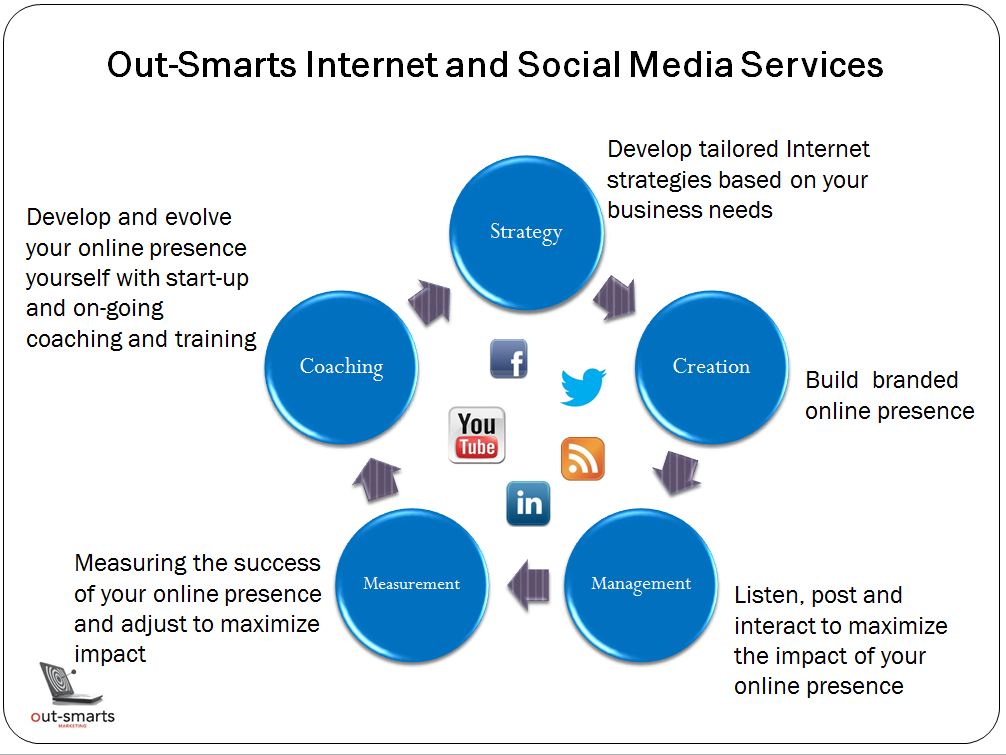
Here at Out-Smarts we always emphasize the importance of strategy when it comes to any social media or internet marketing project, and social ads are no exception. First of all, you need to consider your audience. Who are they and which networks do they use. This will help you determine whether to use Facebook, LinkedIn or another network. Next, you need to consider your goals and how you will measure success.

We were approached recently by a client of ours who had (as an experiment) run simultaneous ads on Facebook and on LinkedIn. The ads were almost identical but whilst the Facebook ad had a phenomenal click through rate, there was not a single click through on LinkedIn. They wondered why this had happened, and how the could track whether the Facebook ads converted to actual business for them.

There are two issues here, the first being the target audience. The reason they were more successful on Facebook is that their target audience is much more likely to be on Facebook, and using it on a regular basis, than LinkedIn. When you are considering which social advertising forum to use, it is always important to consider which tools your audience uses – doing so will help you cut to the chase and will make the likelihood of  success higher. If your product or service is aimed at a consumer or broader target audience, then Facebook is going to be better than LinkedIn. If your product or service is business-to-business then LinkedIn will be the way to go. If you have a large brand aimed at the mom community, Twitter might be your best bet.

The second issue is how to track the success of your ads. It is important to consider what your goals are from running the ads (do you want to build your following, drive traffic to your website, etc, and by how much?) and then put processes in place that allow you to do this effectively. If web traffic is your goal, Google Analytics allows you to track conversions from your Facebook ads (but that is a whole other blog post!). If you want to track sales, put processes in place to ask people who buy from you, or who inquire about your products or services, how they heard about you. What is important here is to set realistic goals and outline how you will track them, otherwise why bother?

Once you have determined which tools are best for your audience and how you will measure your success, the process of creating your ads is relatively simple. In the coming weeks we will be creating some how-to posts designed to help you do just that. In the meantime, if you are interested in advertising using social media but don’t have the time or wherewithal to do so, please contact us – this is what we do and we’d love to help!

Other posts about online advertising:

An Introduction to Internet Advertising

The Future of Digital Advertising – iAds and Promoted Tweets


Why You Should Use LinkedIn for Business

Written by , August 05th, 2011

LinkedIn recently overtook MySpace as the second largest social network. With over 100m users worldwide, LinkedIn is not only onelinkedin icon1 Why You Should Use LinkedIn for Business of the most popular networks but also one of the oldest (launched in 2003), and it is by far the most used network in the business community.

These days, if you are a professional and you’re not on LinkedIn you risk being perceived as old fashioned, out of touch, or worse, lazy. If you have been procrastinating about using LinkedIn for business and are not sure where to start, this blog post is for you.

LinkedIn 101

LinkedIn is a social network that centers around your career and your connections. You post your resume, in as much or as little detail as you feel comfortable with, and start connecting with people you work with, or have worked with in the past. You also connect with people you went to school with, or people you know through your existing business connections.

Why use LinkedIn?

People use LinkedIn for a multitude of reasons. Your goals and usage will depend on your career, your ambitions, your role and, ultimately, your business goals.

If you don’t have any other social media presence, and you’ve avoided it like the plague, then LinkedIn is the place you should start. Given that, with the current economic times, no job is a job for life; building a LinkedIn presence can help you stay current – just in case. Not only that, LinkedIn can also save you a lot of time and effort in your current role. Those are just a couple of reasons why LinkedIn is a must for business people. Here are ten more reasons why every business person should be on LinkedIn:

1.  LinkedIn for Research – LinkedIn’s questions and answers is great place to crowd source.  If you are working on a project and need to do some research, why not consider asking the LinkedIn community. People are often keen to show their knowledge, and you will find that if you word your question correctly you will get valuable feedback, links and information that will save you time.

2.  Looking for work? Find out if the person who is hiring, or prominent people from the company that you want to do business with, are in your extended network and ask for a connection from the person you have in common. It’s always easier to get an interview or a first meeting if you are referred by someone trusted. Also if you are on the job market, make sure that you post your resume to LinkedIn and update it as your experience grows. LinkedIn is often the first place recruiters look when considering hiring someone.

3. Share an Update – Use your status updates on LinkedIn wisely. You can use them to inform your networks of what you do, or what you are looking to do. For example, if you are conducting a strategy session with a client, tell your network that – many of them might not know that you provide this service. Or you can entrench yourself as an expert  in your field by posting valuable links to articles or news pertinent to your field that will educate or add value for your connections.

4. Company Profiles – LinkedIn isn’t just for individuals, businesses can have profiles too, and yours should. Doing so will help build your organization’s web presence, will allow interested parties to learn more about your business, give you valuable referrals and will improve your web ranking.  Make sure that employees know about your page and link to it, and that your services are prominently displayed.

5. Save Time and Maintain Relationships – In the old days people had a rolodex and had to lift a phone on a regular basis in order to keep in touch with their connections, and only managed to keep in touch with the main ones because it took so much time. These days you can use tools like LinkedIn to stay at the forefront of people’s minds (even those on the periphery of your network).  I am not saying that you shouldn’t lift a phone – you should, but by using LinkedIn you can more easily keep in touch with more people and augment your relationships.

6. Build Your Network – Not only is it important to keep in touch with people but it is also important in business to connect with new people.  When you do so, follow up with a LinkedIn connect request and take advantage of your in person networking in the virtual world too.  Get in the habit of doing this and your LinkedIn network will quickly grow.  Connect with people you meet, work with, people you connect with online and use this as a way to stay in touch with your connections as in point five above.

7. Reach the Powers that Be – LinkedIn is the social network used most by top level executives so it can be a really valuable tool in connecting you with decision makers. This is especially powerful for strategic selling.

9. Hiring – with over 100m potential candidates online, have you thought of using LinkedIn to facilitate in your hiring process? People use LinkedIn for recruitment and for finding jobs and, given the professional nature of the tool, it can help you find just the right person for the job. You can easily set this up – it costs about $195 for a 30 day job posting.

10. Advertise – LinkedIn recently started allowing members to advertise on its network in a highly targeted way. You can advertise to specific people by company, geography, title, gender and age. You only pay for click throughs (each time someone clicks on the ad) and the cost is quite affordable (minimum $10 per day), but one downside is that you are limited by characters in the text.

If LinkedIn is on your to-do list please remember that we provide LinkedIn set up, maintenance, education and coaching services. Contact us and let us know how we can assist.

Please connect with  us on LinkedIn  at Out-Smarts or with Mhairi.

Related articles:

http://www.out-smarts.com/2010/01/21/using-social-media-for-recruitment-part-1-linkedin/

http://www.out-smarts.com/2009/04/17/is-your-company-on-linkedin/

http://www.out-smarts.com/2008/10/27/the-out-smarts-podcast-11-linkedin-with-rob-duncan/

Tumblr: The Easiest Way to Blog

Written by , July 27th, 2011

Tumblr is a microblogging platform that allows users to share just about anything via their personal Tumblelog. You can tumblr logo Tumblr: The Easiest Way to Blogquickly and easily post whatever you want – text, photos, videos, music, quotes, and links, from wherever you want – your web browser, phone, desktop computer, or email. The service prides itself on its ease of use, as well as the ability to customize everything including the colors of your Tumblelog and the HTML code of your Tumblr theme.

As of last month, Tumblr has surpassed WordPress in total number of blogs with more than 20 million. In fact, Tumblr has almost 22 million blogs, more than 7 billion individual blog posts, and averages more than 30 million posts each day. The service also boasts a retention rate of 85% versus Twitter’s 40% – once users sign up for Tumblr they are very likely to continue using it. When you compare Tumblr’s retention rate with traditional blogging you can see that they must be doing something right!

Benefits of Tumblr

Tumblr is poised to do to blogging what texting did to email, ie. not rendering it obsolete, but certainly giving it a run for its money.

With Tumblr, you spend less time writing content, and yet readers of your Tumblelog tend to get a better picture of who/what you are as a person or company. As founder David Karp said, “Tumblelogs don’t need all the context of written post. The context is the blog itself, or the person writing it.” Reading one post in someone’s Tumblelog doesn’t tell you much, but browsing through their posts gives you a remarkably accurate picture of who/what they are, without all the reading associated with a traditional blog. Also, Tumbelogs are likely to appeal to a wider audience, as some will prefer the assortment of photos, video files, and links that a traditional blog may be lacking.

Tumblr’s API allows Tumblelogs to be extensively modified; users can delete all the basic formatting and start from scratch. If you can imagine it, chances are you can do it with Tumblr. The outcome for brands and businesses is huge; connect more deeply with your readers, in less time, and on your customized, easy to use microblog. No wonder Tumblr is exploding in popularity!

To find out more about why everyone loves Tumblr, click here to see the many features available to you via your Tumblelog.

The Google+ Project

Written by , July 13th, 2011

It’s been a couple weeks since giant Google launched their latest effort in social, Google+. The search giant has had a couple false starts google+ icon The Google+ Projectin their attempt to go social with both Google Wave and Google Buzz failing to catch users’ attention. However, from the buzz around the web, Google+ might just have the potential to rival the leader of social, Facebook.

What is Google+?

In short, Google+ is Google’s latest attempt at a social network. The official Google blog stated that,

“Today, the connections between people increasingly happen online. Yet the subtlety and substance of real-world interactions are lost in the rigidness of our online tools. In this basic, human way, online sharing is awkward. Even broken. And we aim to fix it.”

To facilitate ease of sharing, Google is integrating many of their current features and products into Google+ in the form of Circles, Sparks, Hangouts, and Mobile. They’ve also included a ‘Stream’, analogous to Facebook’s newsfeed or the Twitter stream – something social savvy users will find familiar. The constantly updating stream will aggregate updates and postings from all your friends in one place.

circles icon The Google+ Project

Circles

Circles are similar to Facebook lists, but easier and more intuitive. The premise behind circles is that people don’t want to share everything with everyone. For example, you most likely share different things with your friends than you do with you family, and you probably want to keep your weekend escapades separate from the information you share with your work contacts. You can easily do this by separating your contacts into different circles, such as ‘friends’, ‘family’, ‘work’ or a customized circle. To do this, simply click on a contact and drag them into the appropriate circle where they will only see the information you want them to see.

circles The Google+ Project


sparks icon The Google+ Project

Sparks

Sparks brings content to you automatically based on whatever ‘sparks’ your interest. Maybe you’re interested in cycling, dogs, cooking, or you’re a car enthusiast – sparks collects interesting content from across the internet and brings it right to you, on a separate page for each topic. It’s easy get started with Sparks, you type a topic of interest, such as ‘social media’ into the search box and, if you like the content that appears, you can click ‘Add Interest’ and social media will be added to your Sparks.

sparks The Google+ Project

If you later decide you don’t want to follow a certain topic, it’s easy to delete it from your Sparks – simply hover over the topic you wish to delete and click the X.

hangouts icon The Google+ Project

Hangouts

This is basically video chat, with an added twist of being able to have a multi-person video chat. You can choose which friends, or even entire circles, you wish to video chat with, and anyone in the Hangout can invite their own contacts to join as well.

hangout The Google+ Project

Mobile

huddle icon The Google+ Project

Huddle

If you remember group messaging from the days of msn messenger, you’ll quickly understand the Huddle feature. Instead of having multiple similar conversations, you can instead start a Huddle where everyone can chat together. This feature could be incredibly useful for trying to make plans to get any group of people to meet all at one place at one time.
instant upload icon The Google+ Project

Instant Upload

Photos taken on your mobile phone will be automatically added, with your permission, to a private photo album in the Google cloud. This way, you can share them straight from Google+, without the hassle of traditionally uploading them. Many users fear only having a copy of their photos in the cloud, which is why it’s easy to backup your online images to your home computer using Google Takeout.
location icon The Google+ Project

Location

You can easily add your location to every post you make in Google+. Or not, the choice is up to you.

Privacy

Social networks, most notably Facebook, have been notorious for their privacy issues. Google has tackled users’ privacy concerns by making it easy to customize your Google+ profile’s visibility. Your name and photo (if you upload one) are the only things that are public on your profile, everything else can be customized to private. Or, you can assign different levels of profile visibility to different circles. Furthermore, the names of your circles won’t be disclosed, not even to the people that are in them. So, feel free to put someone in the acquaintance circle without worrying about insulting them!

As with Facebook, you can block people you don’t want to interact with, and choose whether or not your profile is indexed by search engines.

How to join Google+

Currently Google+ is in Beta testing stage and  can only be accessed through invitation from a current Google+ user. If you have a friend already on Google+, ask them to invite you! Or, you can sign-up here with your Google ID and be notified when Google is allowing more users access to the testing stage.

If, once you’re a Google+ member, you decide it isn’t for you; you can downgrade your account by following the steps in this guide. Deleting just your Google+ account will leave your other Google accounts unaffected, or you have the option to delete your entire Google Account and all associated services.

Have you tried Google+? What do you think of it? Let us know below in the comments section.


Introducing WikiLove

Written by , June 29th, 2011

Wikipedia has introduced their ‘love’ button, called WikiLove. This new feature will help users and editors of the crowdsourced wikipedia icon Introducing WikiLoveweb encyclopedia show their appreciation for one another. It can be tough to be accepted by the inner circle of experienced Wikipedia editors, and many editors feel looked down upon and discouraged from contributing to articles. Wikipedia is hoping that WikiLove will change this, and make it easy and fun for users to demonstrate their positive feelings towards one another.

How It Works

Starting today, WikiLove will be available for all English Wikipedia users. If you don’t see it yet, you can still test out the prototype by following the instructions and creating a test account.

To get started, login and visit any user, or user talk, page. In the upper right hand corner, between the search bar and the watchlist icon, you will see a new red heart icon.

wiki red heart button1 Introducing WikiLove

Clicking this button will bring up a screen that looks like the following:


wikilove window Introducing WikiLove


From here, users can show their appreciation with a Barnstar, Food and drink, Kittens, or they can make their own gift. There are also further subcategories within the Barnstar group, in order to give someone a gift that more closely resembles what you appreciate about them. For example, under the ‘Barnstar’ tab, users can choose the ‘Real Life Barnstar’ which is awarded to editors who make contributions both online and offline, by organizing wiki-related real-life events.


Real Life Barnstar Introducing WikiLove

After you’ve chosen the gift you would like to give, enter a personal message and click to preview your selection. If you’re satisfied with your choice, hit ‘send WikiLove’, and you’re WikiLove will appear on the user’s user talk page.


wikilove messages Introducing WikiLove

Benefits of WikiLove

WikiLove has built-in analytics that allows Wikipedia to see how often it is used, and whether or not its usage affects new editors’ activity on the site. WikiLove will be a first step in making Wikipedia more inviting and friendly towards the new user. Futhermore, Wiki administrators can modify the user interface using the instructions for customization. This enables different cultures around the world to award culturally significant gifts – such as matryoshka dolls in Russia, or coffee in Brazil.

If you’re not interested in WikiLove, you can disable it by going to ‘My Preferences’ in the top right-hand corner by the log-out button. Next, click the ‘editing’ tab, and scroll down to the bottom where you will need to uncheck the box titled ‘enable showing appreciation for other users with the WikiLove tab (experimental)’. Remember to save your changes when you are done.

disable wikilove Introducing WikiLove

In the spirit of the collaborative nature of Wikipedia, once you’ve tested out WikiLove, let them know your thoughts and comments on the WikiLove talk page.

Twitter Changes the ‘Following’ List

Written by , June 16th, 2011

Twitter is rolling out some new features on their site. If you don’t yet see the following changes, you will soon!

The biggest changes are to the ‘following’ link, under the profile tab. Now, instead of seeing a list of everyone a person is following, you will see their Twitter stream as they see it. The exception is that you will not be able to see the tweets of people they follow that have protected their tweets. This is what users will see when they click the “following” link on Out-Smarts’ Twitter page.

new following link Twitter Changes the Following List

To see the old following list, click on the ‘people’ tab as shown in the above image. This will enable you to see all of the people that person is following in the old format. From the people tab you can also see a list of people you are both following by clicking the ‘you both follow’ link.

old following list Twitter Changes the Following List

You can also access the old following list by clicking ‘view all’ beside the ‘following’ heading on the lower right hand panel.other following list1 Twitter Changes the Following List

Finally, Twitter has introduced a new ‘shuffle’ feature. When you have clicked to see who a person is following, and are viewing their Twitter stream as they see it, you’ll find the shuffle button in the upper right corner of your screen.

shuffle button1 Twitter Changes the Following List

Hovering over this button tells you that you can ‘jump to someone you follow’. This option takes you to the Twitter account of someone you both follow, and shows you their Twitter stream.

What do you think of these new features?